CTR Sprout vs CTRTool: Customizable User Behavior Face-Off
You picked WhatsApp for drip campaigns, but most marketing tools still treat it as an afterthought with clunky scheduling and no real personalization. Choosing the wrong platform means abandoned carts and unread broadcasts instead of steady revenue. This...
You are comparing two CTR tools and need to know which one actually gives you control. Every campaign setting matters when you are paying for visits: device type, keywords, location, daily search count, and which links get clicked. Some tools leave those choices vague.
This face-off covers the quick verdict, what CTRTool and CTR Sprout each do, and a feature-by-feature comparison of customization, screenshot proof, and campaign coverage across Google Search, Bing, Maps and AI Overviews. You will also see pricing and a clear recommendation on who should pick each tool.
Quick Verdict: CTR Sprout vs CTRTool
CTRTool is a CTR campaign tool that provides screenshot proof for every visit, while CTR Sprout is a competing CTR manipulation service with a different feature set and pricing model. Both sit in the same corner of search engine optimization: sending behavioral signals to a page so that SERP ranking can improve over time. The difference lies in how much of that process you can see, verify, and control.
The table below summarizes the core distinctions based on publicly available information about each product.
| Factor | CTRTool | CTR Sprout |
|---|---|---|
| Proof mechanism | Screenshot proof for every visit, with search and landing screenshots as separate images | CTR manipulation service with its own reporting approach; specifics vary and should be checked directly |
| Visit depth | Full visit paths, with visits up to 5 minutes and up to 5 additional internal pages | Offers visit-based campaigns, though depth and path detail are not standardized across the category |
| Campaign coverage | Desktop and mobile campaigns for Google Search, Bing Search, Maps, and AI Overviews | Generally positioned as a CTR tool for search campaigns; exact platform coverage should be confirmed with the vendor |
| Tracking | Keyword positions tracked over time, including Maps listing order and AI citation order | Provides campaign-level reporting; position tracking detail may differ |
| Billing model | Pay-for-results credits, no credits charged for technical failures before landing, and unverifiable locations use no credits | Subscription-style pricing is common in this category; confirm current terms directly |
| Starting price | $59/month | Varies; pricing is not standardized and should be verified with the provider |
CTRTool's strongest differentiator is screenshot proof for every visit. You can open a campaign and see the actual search result and the actual landing page as separate proof images, rather than trusting a summary count. Combined with full visit paths, that makes customizable user behavior something you can audit rather than assume.
Coverage is the second clear split. CTRTool runs desktop and mobile campaigns across Google Search, Bing Search, Maps, and AI Overviews, so keyword targeting is not limited to classic blue-link results. A single credit balance is shared across all campaign types, websites, and keywords, and unused credits roll over while you are subscribed.
CTR Sprout remains a recognizable name in the CTR manipulation space, and readers comparing tools will likely encounter it. Its public positioning centers on sending clicks to targeted pages, but specific specs, platform support, and pricing terms are best confirmed directly with the vendor rather than assumed.
On the operational side, CTRTool supports up to 100 campaigns with 100 keywords each and charges no credits for technical failures before landing. Those details matter for anyone running sustained campaigns where click velocity and visit quality need to stay consistent.
Recommendation: Choose CTRTool if you want verifiable visit proof, multi-platform coverage including Maps and AI Overviews, and a pay-for-results credit model starting at $59/month. Consider CTR Sprout only after confirming its current feature set and pricing directly, since its offering is less transparent from the outside.
At a glance: how CTRTool compares to CTR Sprout on the features that matter most.
| Feature | CTRTool | CTR Sprout |
|---|---|---|
| Pricing | $59/mo | $79/seat/mo |
| Free plan / trial | ✗ | 30-day trial |
| API access | ✗ | ✓ |
| Analytics / reporting | ✓ | ✓ |
| Keyword monitoring | ✓ | ✓ |
| Team / collaboration | ✗ | ✓ |
| AI-powered features | ✗ | ✓ |
| Screenshot proof per visit | ✓ | — |
What Is CTRTool?
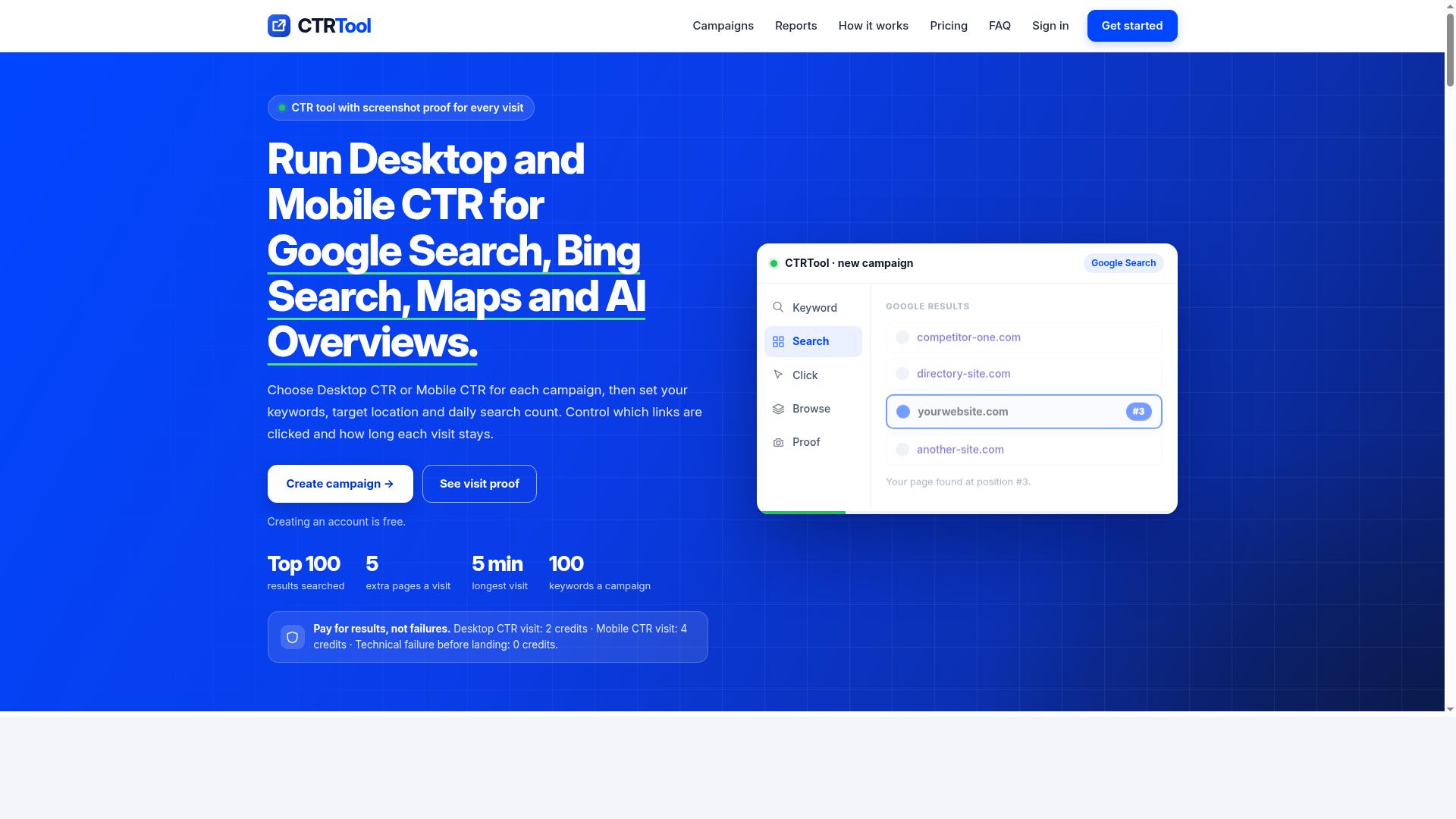
CTRTool is a SaaS platform that runs desktop and mobile CTR campaigns for Google Search, Bing Search, Maps, and AI Overviews, with screenshot proof for every visit. It is built for SEO practitioners and agencies managing campaigns for their own sites or for client websites.
The core purpose is straightforward: give practitioners control over how click-through rate campaigns are configured and how each visit behaves. Every visit is documented with a screenshot, so campaign activity can be reviewed rather than taken on faith.
Campaign setup follows a defined set of choices. Per campaign, users select Desktop CTR or Mobile CTR, then set keywords, target location, and daily search count. This covers the main variables that shape how a campaign runs against a given keyword set.
Beyond the basics, users control which links are clicked and how long each visit stays. Those two settings matter for anyone thinking about user engagement metrics such as dwell time, since visit duration is a configurable part of the campaign rather than a fixed behavior.
For agencies, the practical value sits in repeatability. A campaign can be scoped to a client's keyword targeting, location, and device type, then tracked as a distinct unit. Keyword positions can be followed over time, which gives practitioners a way to observe movement alongside the campaign record.
It is worth stating the platform's own position plainly. The site notes that automated visits do not guarantee rankings. That framing keeps expectations grounded: CTRTool is a campaign execution and proof tool, not a promise of SERP ranking outcomes.
What Is CTR Sprout?
CTR Sprout is a CTR manipulation tool that aims to improve search rankings by simulating organic clicks, though specific details about its features and pricing are not publicly verified. It sits in the same broad category as other click-through rate tools: software that sends automated traffic to a page in an effort to influence behavioral signals tied to SERP ranking.
At a high level, tools like this try to shape how a page looks to search engines. The idea is that steady clicks on a result, paired with realistic on-page behavior, may suggest to the Google algorithm that the page satisfies search intent. Whether that works in practice depends heavily on how convincing the simulated activity is.
Based on its positioning, CTR Sprout appears to present itself as a campaign management option for marketers who want to run click campaigns without building their own infrastructure. Public information about its interface, targeting controls, and traffic sources is limited, so readers should treat any claims about its capabilities with caution.
It is also worth noting what CTR manipulation tools generally attempt to influence. The signals most often discussed in this space include:
- Dwell time, or how long a visitor stays on a page after clicking
- Bounce rate and pogo-sticking, where users return to the SERP quickly
- Click velocity, or the pace at which clicks arrive
- Query relevance, meaning clicks that match real search terms
How well CTR Sprout handles any of these is not something that can be confirmed from public sources. What can be said is that the category as a whole lives or dies on customizable user behavior: the ability to vary clicks, timing, and session patterns so the activity resembles real organic traffic.
For the purposes of this comparison, CTR Sprout is best understood as a competitor with a recognizable premise and limited public transparency. Buyers evaluating it against CTRTool should look closely at how each tool lets them control user engagement metrics and whether the underlying traffic setup is described clearly enough to judge.
Features Compared
This section compares the key features of CTRTool and CTR Sprout across customization, proof and transparency, and campaign coverage. Each subsection below examines how the two tools handle a specific part of customizable user behavior setup and reporting.
CTRTool is documented in detail, with screenshot proof for every visit and support for multiple campaign types including Google Search, Bing, Maps, and AI Overviews. CTR Sprout's features are described in general terms, so readers should confirm specifics directly with that provider.
Customization: Desktop vs Mobile, Keywords, Location and Daily Search Count
CTRTool allows users to choose desktop or mobile CTR per campaign, set keyword targeting, and specify location down to country, state, and city, while CTR Sprout's customization options are less documented. For practitioners who treat click-through rate as a controllable variable, this level of granularity matters.
Within CTRTool, each campaign supports up to 100 keywords, with search depth up to 100 results. Location targeting covers country, state, and city, or an Any country option for broader runs. These controls let users align search queries and geography with the audience they want to simulate.
Daily search counts can be set with now, spread out, or gap timing, along with chosen days, hours, and time zone. Daily goals reset at 00:00 UTC, which keeps scheduling predictable across regions. Campaign setup also includes target URL, internal page URLs, link text, click order, scrolling time, and up to five additional pages per visit.
For CTR Sprout, the available information suggests it may offer similar options, but without verified specifics on keyword depth, location granularity, or scheduling. Readers comparing the two should ask directly about these settings before committing. On the documented side, CTRTool's keyword targeting and location controls are spelled out clearly enough to plan a campaign in advance.
Proof and Transparency: Screenshot Proof for Every Visit
CTRTool provides screenshot proof for every visit, including search and landing screenshots as separate proof images, along with full visit paths and keyword position tracking. This gives agencies and SEO practitioners a verifiable record they can review after a campaign runs.
Position tracking extends beyond standard search results. CTRTool records keyword positions over time, including Maps listing order and AI citation order. For teams watching SERP ranking movement alongside behavioral signals, that history is useful evidence when reporting to clients.
Proof also connects to billing. CTRTool uses a pay-for-results credit model with no credits charged for technical failures before landing, and visits that cannot verify the requested location use no credits. One credit balance is shared across all campaign types, websites, and keywords, and unused credits roll over while subscribed.
CTR Sprout's proof mechanisms are not publicly verified, so users should inquire directly about what documentation it supplies. Without confirmed screenshots or visit paths, it is harder to demonstrate that user engagement metrics came from real sessions rather than assumptions. For anyone who needs audit-ready records, CTRTool's documented proof stands out as the clearer option.
Campaign Coverage: Google Search, Bing, Maps and AI Overviews
CTRTool supports campaigns for Google Search, Bing Search, Google Maps, and AI Overviews, while CTR Sprout's campaign coverage is not as clearly documented. Each campaign type targets a distinct surface, which helps when a strategy spans multiple engines.
Search campaigns cover keyword and click on an organic result across the top 100 results, on desktop or mobile, with internal pages included. Bing Search CTR follows the same structure. Google Maps CTR finds a business listing and clicks its website link, working across up to 50 listings with city targeting. AI Overview campaigns locate a website in the overview and click its source link, with citation order tracked.
Delivery runs through Desktop Chrome windows and real Android phone sessions matched to the target location through managed proxy routes. This setup supports the location targeting described earlier and keeps sessions consistent with the chosen geography.
CTRTool also supports up to 100 campaigns with 100 keywords each, giving room for campaign management at scale. CTR Sprout may cover similar platforms, but without verified details on surfaces, listing limits, or AI overview handling. Readers should confirm coverage directly before assuming parity, since documented scope is what makes multi-surface planning reliable.
Pricing Compared
CTRTool offers monthly plans starting at $59 for 2,000 credits, while CTR Sprout's pricing is not publicly verified and should be confirmed directly with the vendor. That difference alone shapes how easily a buyer can plan a budget. CTRTool publishes its tiers in USD on its site, so you can map spend to expected volume before committing.
The entry point is Starter at $59/month for 2,000 credits, which covers up to 1,000 desktop CTR visits or 500 mobile CTR visits. That framing matters for anyone running customizable user behavior campaigns, because you know the credit cost of each action up front.
Higher tiers scale in a predictable line. Growth runs $125/month for 5,000 credits (up to 2,500 desktop or 1,250 mobile visits) and is marked Recommended. Scale is $399/month for 20,000 credits, and Agency is $699/month for 40,000 credits.
| Plan | Monthly Price | Credits | Approx. Visit Capacity |
|---|---|---|---|
| Starter | $59 | 2,000 | Up to 1,000 desktop or 500 mobile |
| Growth (Recommended) | $125 | 5,000 | Up to 2,500 desktop or 1,250 mobile |
| Scale | $399 | 20,000 | Up to 10,000 desktop or 5,000 mobile |
| Agency | $699 | 40,000 | Up to 20,000 desktop or 10,000 mobile |
| CTR Sprout | Not publicly verified | Not publicly verified | Confirm with vendor |
The credit model is where the real value comparison sits. A desktop CTR visit costs 2 credits and a mobile visit costs 4. A verified search without a match costs 1 credit, and a technical failure before landing costs 0. That last detail protects your budget when a campaign does not land as expected.
Unused credits roll over while your subscription is active, though they expire when cancellation takes effect. Creating an account is free, so you can inspect the dashboard before paying. Custom development carries a separate, agreed one-time fee.
CTRTool also flags limited launch pricing, noting that prices rise 30% on November 15. Buyers comparing against CTR Sprout should weigh that stated schedule against a competitor whose rates require a direct quote. For most teams, the transparent credit tiers and the zero-credit failure rule make CTRTool the easier option to budget and defend.
Who Should Choose CTRTool
CTRTool is best suited for SEO practitioners and agencies who need verifiable proof of CTR campaigns across multiple search engines and platforms. The tool is built around screenshot proof and detailed tracking, which matters when a campaign has to be justified to a paying client or documented for an internal report.
That focus on evidence separates CTRTool from tools that only report aggregate numbers. For agencies running campaigns on behalf of clients, a documented trail of activity and results is often as valuable as the ranking movement itself.
The platform supports Google Search, Bing Search, Google Maps, and AI Overviews, so a single strategy can cover several surfaces where users encounter a brand. That versatility helps practitioners avoid stitching together separate workflows for each platform.
Multi-platform coverage is increasingly relevant as search results diversify. A campaign that only addresses classic blue links may miss the map packs and AI-generated summaries where visibility also matters.
Several scenarios fit CTRTool particularly well:
- Client reporting: agencies that must show documented evidence of campaign activity alongside performance changes.
- Multi-engine strategies: teams targeting Google Search and Bing Search with one coordinated approach.
- Local visibility work: practitioners who want to address Google Maps alongside organic results.
- AI Overviews: campaigns that account for AI-generated summaries as part of the broader search experience.
The site's own guidance mentions using tier links, PBNs, and test properties, which points to practitioners who already understand link and property structures and want campaign tooling that fits that vocabulary. These are established SEO techniques, and CTRTool is positioned for users comfortable working with them.
For an agency, this means campaigns can be organized around the assets a client already owns or around supporting properties built for testing. Detailed tracking then helps connect that setup to observable outcomes.
CTRTool is less about quick one-off experiments and more about repeatable, documented campaign management. Teams that run ongoing work for multiple clients tend to get more from that structure than someone testing a single keyword once.
Practitioners who mainly want a lightweight interface for casual experimentation may find the emphasis on proof and tracking heavier than they need. That is a reasonable trade-off, since the same depth is what makes client-facing reporting credible.
In short, CTRTool fits SEO professionals and agencies who treat CTR campaigns as a measurable service, need evidence they can share, and want coverage across Google Search, Bing Search, Google Maps, and AI Overviews rather than a single surface.
Who Should Choose CTR Sprout
CTR Sprout may be suitable for users who prioritize different features or pricing, but its specific advantages should be evaluated based on direct information from the vendor. This section does not claim any particular capability, plan, or result for CTR Sprout, and readers should treat it as a starting point for their own research.
Broadly, a tool like CTR Sprout might appeal to buyers who are shopping for alternative CTR manipulation tools and want to weigh more than one option before committing. That is a reasonable instinct. The important part is verifying what each vendor actually offers rather than relying on marketing language.
Before deciding, compare candidates on the factors that shape day to day use of a customizable user behavior platform. Ask how each tool handles the mechanics that matter for realistic traffic simulation.
- How clicks are distributed across search queries and keyword targets
- Whether IP rotation and proxy handling are explained clearly
- How campaigns are organized inside the dashboard
- What proof or reporting the vendor provides for delivered activity
- Published pricing and what each tier includes
Each of these points affects how believable behavioral signals look to a search engine, and how much control a user has over a campaign. A vendor that explains its approach openly is easier to evaluate than one that does not.
Research CTR Sprout directly through its own documentation, pricing pages, and support responses. Confirm how it manages click velocity, targeting options, and reporting before assuming any capability. Where details are unclear, ask the vendor rather than filling gaps with assumptions.
The right choice comes down to individual needs. A buyer focused on a narrow budget might weigh cost first, while someone running larger campaign management workloads may care more about control and consistency. Neither priority is wrong, but each points to different questions.
For readers who want a platform built around CTRTool, the comparison should be made on verified information, not on guesses about either product. Evaluate CTR Sprout on its own merits, then hold CTRTool to the same standard using its published details.
Final Verdict
CTRTool stands out for its screenshot proof and multi-platform campaign coverage, making it a strong choice for SEO professionals who value transparency and verifiable results. Across this face-off, the deciding factor is not which tool offers more customization options on paper, but which one gives you evidence you can inspect and share. CTRTool answers that question directly, while CTR Sprout leaves more open to interpretation.
CTRTool's core advantages come down to three verifiable points. First, screenshot proof for every visit, so campaign activity can be checked rather than assumed. Second, full visit paths, which show how sessions progress instead of presenting isolated clicks. Third, keyword position tracking, which ties campaign work back to where a target query actually ranks.
Coverage is the other differentiator. CTRTool runs campaigns across Google, Bing, Maps, and AI Overviews, with pricing starting at $59/month. For teams managing search visibility beyond a single engine, that spread matters more than any single feature.
| Factor | CTRTool | CTR Sprout |
|---|---|---|
| Proof of visits | Screenshot proof for every visit | Not publicly verified |
| Visit visibility | Full visit paths | Not publicly verified |
| Keyword position tracking | Included | Not publicly verified |
| Platform coverage | Google, Bing, Maps, AI Overviews | Details not publicly confirmed |
| Pricing | Starting at $59/month | Not publicly confirmed |
CTR Sprout is a legitimate competitor in the customizable user behavior space, and readers comparing tools will likely come across it. That said, publicly verified proof and pricing details are lacking, which makes a side-by-side evaluation harder. When a tool cannot be checked against documented evidence, the comparison rests on claims rather than confirmation.
Our recommendation follows from that gap. If your priority is verifiable proof and multi-platform support, CTRTool is the stronger fit. If you are still weighing options, you can reach the team at vaibhav@autoblogging.ai with questions before deciding.
Frequently Asked Questions
What is the core difference between CTRTool and CTR Sprout?
CTRTool is a CTR campaign tool built around screenshot proof for every visit, covering Google Search, Bing Search, Google Maps and AI Overviews, with Desktop or Mobile campaigns you configure per keyword and location. CTR Sprout is a separate product, but the sources we reviewed don't document its plans, pricing or feature set in enough detail to make a like-for-like comparison. We'd recommend checking CTR Sprout's own site directly for its current capabilities before deciding.
Does CTRTool offer screenshot proof, and does CTR Sprout?
Yes - screenshot proof is central to CTRTool: every visit includes search and landing screenshots as separate proof images, plus full visit paths and keyword position tracking over time, including Maps listing order and AI citation order. We couldn't verify whether CTR Sprout offers comparable proof, so we can't make a claim either way. If proof of visit is a priority for your reporting, ask CTR Sprout directly what evidence it provides.
How does pricing work for each tool?
CTRTool publishes clear monthly USD plans: Starter at $59/month for 2,000 credits (up to 1,000 Desktop CTR visits or 500 Mobile CTR visits), and Growth at $125/month for 5,000 credits (up to 2,500 Desktop or 1,250 Mobile visits), with campaigns billed on a pay-for-results credit basis. Pricing for CTR Sprout isn't stated in the sources we researched, so we can't quote or compare its costs. Check CTR Sprout's website for its latest plans.
Which platforms and campaign types does CTRTool support?
CTRTool runs Google Search CTR, Bing Search CTR, Google Maps CTR and AI Overview campaigns, and you choose Desktop CTR or Mobile CTR per campaign. You set keywords, target a country with optional state and city (or "Any country"), and the page must appear within the top 100 organic results for the chosen keyword and location. CTR Sprout's supported platforms aren't documented in our research, so verify its coverage on its own site.
Who is each tool best suited for?
CTRTool is aimed at SEO practitioners and agencies running CTR campaigns for their own or client websites across Google Search, Bing Search, Google Maps and AI Overviews, with global targeting and no stated country restrictions. CTR Sprout may suit different workflows, but without verified details on its audience or positioning we can't say how it compares. Match either tool to your campaign types and reporting needs before committing.
Can I try CTRTool before committing, and how do I get support?
CTRTool lets you create an account on its site, and support is available via vaibhav@autoblogging.ai; the site also lists Support, Terms of use and Legal notices pages. We don't have verified information on CTR Sprout's trial options or support channels, so we can't compare those here. For CTR Sprout's onboarding and support, contact the vendor directly.